Meet Ziggy: How I Transformed My Old Gaming Laptop Into a Powerful Home Server
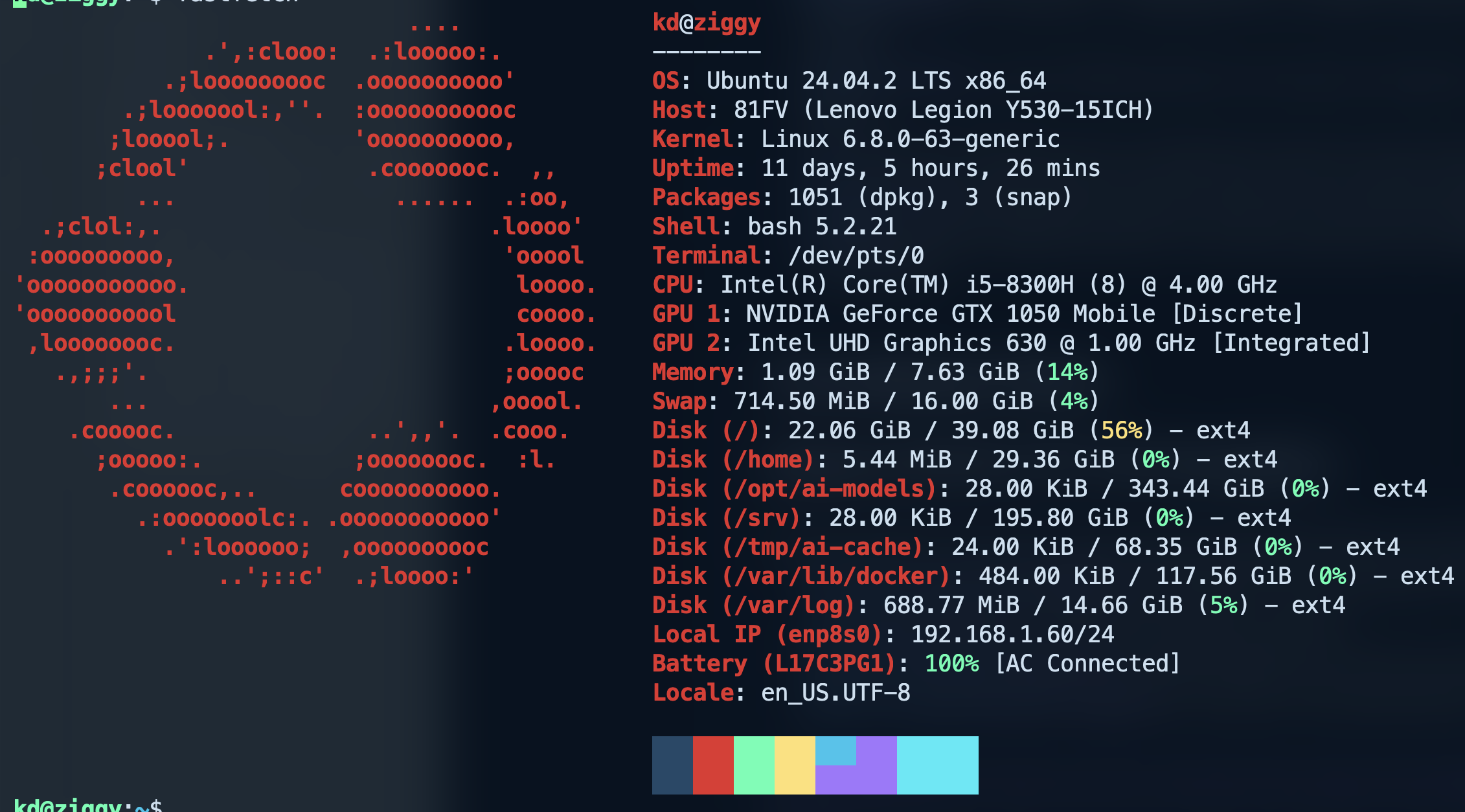
 What do you do with a gaming laptop that's no longer your daily driver? Most people would sell it, store it in a closet, or give it away. But I saw an opportunity to give my trusty Lenovo Legion Y530 a second life as a home server. Meet Ziggy my custom-built home server that's been running for 11 days straight, managing everything from Docker containers to AI models.
The Hardware Foundation
 The Lenovo Legion Y530 might not be the newest kid on the block, but it's surprisingly well-suited for server duties. Originally designed as a gaming laptop, it packs some serious hardware that translates beautifully to server workloads:
Specifications at a Glance
- CPU: Intel Core i5-8300H (8 cores @ 4.00 GHz)
- Memory: 7.63 GiB RAM (14% utilized)
- Storage: Custom partitioned setup optimized for Docker
- Graphics: Dual GPU setup (NVIDIA GTX 1050 Mobile + Intel UHD 630)
- Network: Wired Ethernet connection (192.168.1.60/24)
- OS: Ubuntu 24.04.2 LTS with Linux 6.8.0-63-generic kernel
The Intel i5-8300H is a quad-core processor with hyperthreading, giving us 8 logical cores. While it may not match modern server processors, it's more than capable of handling multiple containerized services, monitoring tools, and even AI workloads.
Why Repurpose a Gaming Laptop?
Repurposing a gaming laptop as a server offers several unique advantages:
- Built-in UPS: The laptop's battery acts as an uninterruptible power supply, providing hours of runtime during power outages
- Compact Form Factor: Takes up minimal space compared to traditional tower servers
- Integrated Components: Display, keyboard, and trackpad are built-in for maintenance tasks
- Energy Efficient: Modern laptop components are designed for power efficiency
- Cost-Effective: Utilizes existing hardware instead of purchasing dedicated server equipment
Custom Disk Partitioning for Docker Workloads
One of the key decisions I made was implementing a custom partitioning scheme optimized for Docker and containerized applications:
Disk (/): 22.06 GiB / 39.08 GiB (56%) - ext4
Disk (/home): 5.44 MiB / 29.36 GiB (0%) - ext4
Disk (/opt/ai-models): 28.00 KiB / 343.44 GiB (0%) - ext4
Disk (/srv): 28.00 KiB / 195.80 GiB (0%) - ext4
Disk (/tmp/ai-cache): 24.00 KiB / 68.35 GiB (0%) - ext4
Disk (/var/lib/docker): 484.00 KiB / 117.56 GiB (0%) - ext4
Disk (/var/log): 688.77 MiB / 14.66 GiB (5%) - ext4
This partitioning strategy serves several purposes:
- /var/lib/docker: Dedicated 117GB partition for Docker containers and images
- /opt/ai-models: Large 343GB partition for storing AI models like Ollama
- /srv: Separate 195GB space for application data and services
- /tmp/ai-cache: Dedicated temporary space for AI model caching
- /var/log: Isolated logging partition to prevent log files from filling the root partition
The Software Stack
Ubuntu 24.04.2 LTS: The Foundation
Ubuntu 24.04.2 LTS serves as the base operating system, providing:
- 12 years of security updates (extended from the standard 10 years)
- Linux kernel 6.8 with enhanced hardware support
- Improved security features including AppArmor enhancements
- Better containerization support for Docker and Kubernetes workloads
CasaOS: The User-Friendly Dashboard

CasaOS transforms the server management experience with its elegant web-based interface. This personal cloud OS provides:
- One-click app installation from a curated app store
- Docker container management without complex command-line operations
- System monitoring with real-time resource usage
- File management through a web-based interface
- Network storage configuration and management
The beauty of CasaOS lies in its simplicity. Instead of memorizing Docker compose commands or wrestling with configuration files, I can deploy new services with just a few clicks. The dashboard provides instant visibility into system performance, running containers, and available resources.
Beszel: Lightweight Server Monitoring
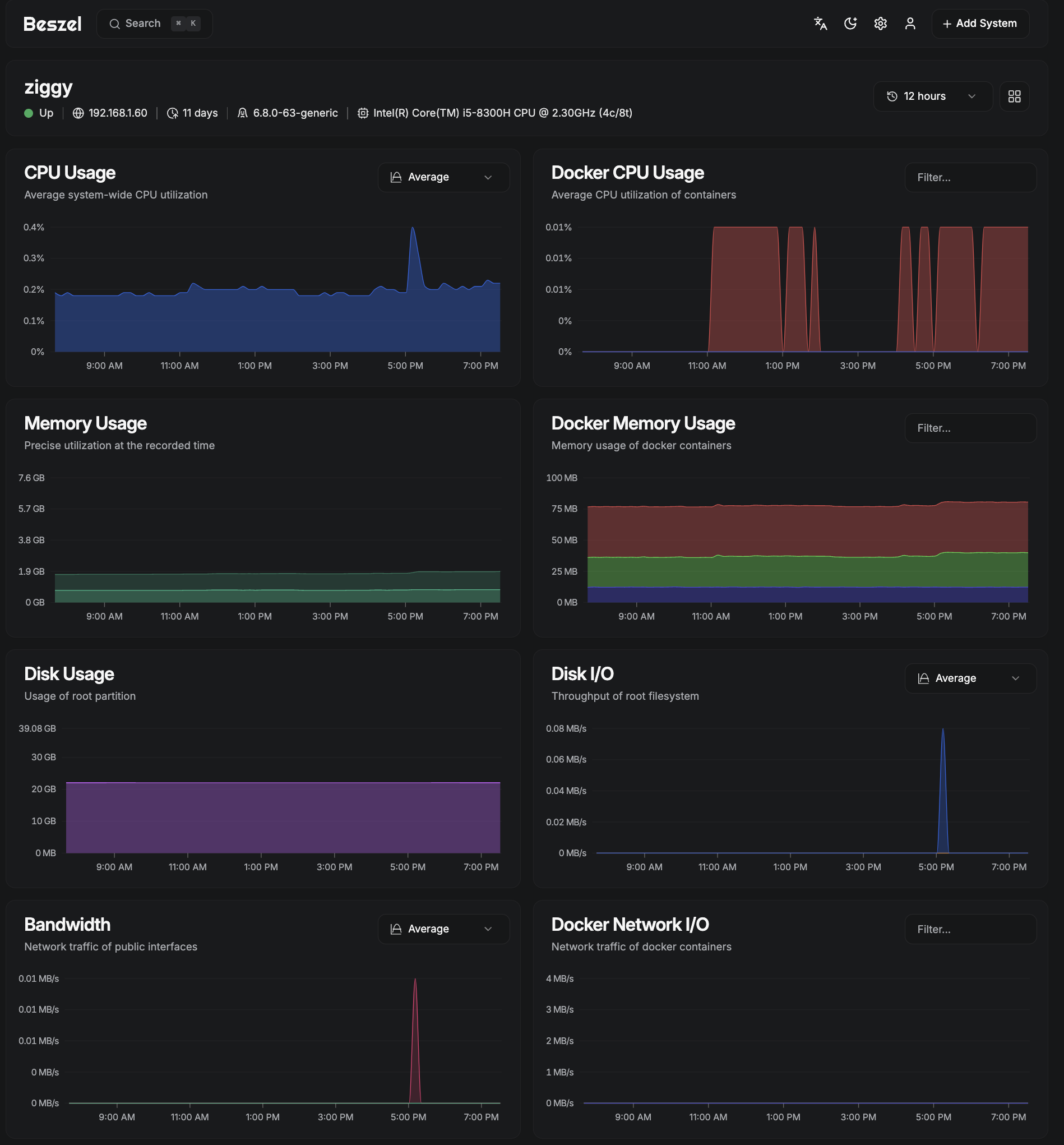
For comprehensive monitoring, I chose Beszel — a lightweight alternative to heavier solutions like Grafana or Prometheus. Beszel excels at:
- Minimal resource footprint — uses less than 1% CPU during operation
- Docker container statistics — tracks CPU, memory, and network usage for each container
- Historical data — maintains performance metrics over time
- Configurable alerts — notifications for CPU, memory, disk, and temperature thresholds
- Multi-system support — can monitor multiple servers from a single hub
The hub-and-agent architecture means I can easily expand monitoring to other devices in my network without complex configuration.
btop: Terminal-Based System Monitoring
 While CasaOS and Beszel provide excellent web-based monitoring, sometimes you need detailed system information directly in the terminal. That's where btop shines:
- Real-time resource monitoring with beautiful ASCII graphics
- Interactive process management — kill, renice, or inspect processes
- Customizable themes and layouts
- Mouse support for easy navigation
- Detailed hardware information including temperature sensors
btop serves as my go-to tool for troubleshooting performance issues or getting a quick system overview during SSH sessions.
AI-Powered with Ollama
Picture showing Ollama running with a 7B model, perhaps terminal output or web interface
 The crown jewel of Ziggy is the Ollama setup running a 7B parameter language model. Ollama enables:
- Private AI inference — no data leaves the local network
- Multiple model support — can run various language models
- API compatibility — integrates with existing AI applications
- Efficient resource usage — optimized for consumer hardware
The 7B model strikes an excellent balance between capability and resource requirements. With 8GB of system RAM and the intelligent memory management of Ollama, the server can handle AI inference tasks while maintaining performance for other services.
The ZiggyBot Project
The Ollama setup powers my ZiggyBot project — a custom AI assistant tailored for my specific needs. This demonstrates how a repurposed laptop can serve as the foundation for cutting-edge AI applications without relying on cloud services.
Performance and Reliability
After 11 days of continuous operation, Ziggy demonstrates impressive stability:
- Memory usage: Only 14% of available RAM utilized
- Storage efficiency: Plenty of room for growth across all partitions
- Temperature management: The Legion Y530's cooling system handles server workloads effectively
- Network stability: Consistent connectivity at gigabit speeds
- Battery backup: Built-in UPS capability for power resilience
Monitoring and Maintenance
The combination of CasaOS, Beszel, and btop provides comprehensive visibility into system health:
- CasaOS Dashboard: High-level overview of system resources and running services
- Beszel Hub: Historical performance data and alerting
- btop Terminal: Detailed real-time system analysis
This multi-layered monitoring approach ensures I can quickly identify and resolve any issues before they impact service availability.
Lessons Learned
Converting a gaming laptop to a server taught me several valuable lessons:
What Works Well
- Thermal management: Gaming laptops are designed to handle sustained loads
- Power efficiency: Laptop components consume less power than desktop equivalents
- Noise levels: Well within acceptable limits for a home environment
- Maintenance access: Built-in display and keyboard simplify troubleshooting
Considerations
- Expansion limitations: Limited upgrade paths compared to desktop servers
- Display management: Need to configure headless operation properly
- Cooling position: Ensure adequate airflow in the server location
Future Expansion Plans
Ziggy's modular architecture makes future expansion straightforward:
- Additional AI models: The large AI models partition can accommodate multiple language models
- Network services: Plenty of storage for additional Docker containers
- Backup solutions: Integration with network-attached storage
- Remote access: VPN or reverse proxy for external connectivity
Cost Analysis
The total investment in this project was remarkably low:
- Hardware cost: $0 (repurposing existing laptop)
- Software cost: $0 (all open-source solutions)
- Power consumption: Approximately 30-40 watts under load
- Monthly operating cost: Less than $5 in electricity
Compare this to cloud-based alternatives:
- VPS with similar specs: $20-50/month
- AI inference services: $0.10-0.50 per request
- Storage services: $10-20/month for equivalent capacity
The ROI is compelling — Ziggy pays for itself within a few months while providing complete control over data and services.
Getting Started: Your Own Laptop Server
Inspired to build your own laptop server? Here's a high-level roadmap:
Hardware Requirements
- Laptop with decent specs: Minimum 8GB RAM, quad-core processor
- Reliable storage: SSD preferred for boot drive
- Stable power: Keep the laptop plugged in
- Network connection: Wired Ethernet recommended
Software Installation
- Install Ubuntu Server 24.04 LTS
- Configure custom partitioning for your use case
- Install Docker and container runtime
- Deploy CasaOS for management interface
- Set up monitoring with Beszel and btop
- Configure your first services
Essential Considerations
- Backup strategy: Plan for data protection
- Security hardening: Firewall, SSH keys, regular updates
- Monitoring setup: Establish alerting before problems occur
- Documentation: Keep notes on configuration decisions
Conclusion
Ziggy proves that you don't need expensive, specialized hardware to run a capable home server. With thoughtful planning, the right software stack, and some creativity, a repurposed gaming laptop can provide enterprise-grade functionality at a fraction of the cost.
The combination of Ubuntu 24.04 LTS, CasaOS, Beszel, btop, and Ollama creates a powerful, user-friendly platform that handles everything from basic file serving to advanced AI workloads. The 11+ days of uptime and low resource utilization demonstrate that this approach is not only viable but sustainable for long-term operation.
Whether you're looking to learn more about server administration, reduce cloud dependency, or simply give old hardware new purpose, building a laptop-based server like Ziggy offers an excellent starting point. The skills gained, money saved, and satisfaction of running your own infrastructure make this project worthwhile for any technology enthusiast.
Have you considered repurposing old hardware for home server projects? What services would you want to host on your own infrastructure? The world of self-hosting offers endless possibilities — and sometimes the best foundation is sitting unused in your closet.